

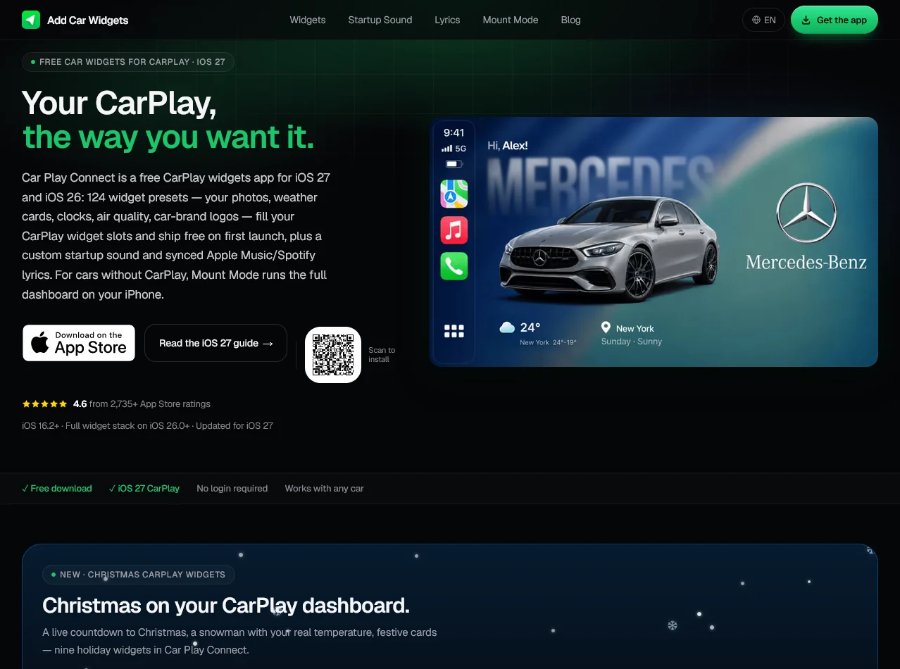
Car Play Connect is an iOS app that extends Apple CarPlay’s widget system—introduced in iOS 26 (June 2025) and carried forward in iOS 27 (14 September 2026)—by offering 124 widget presets across 13 categories that users can add to the five widget slots on their CarPlay dashboard. Unlike stock CarPlay widgets limited to Apple’s default options, CarPlay Connect adds photo cycling widgets, six weather card styles, live air quality (AQI) for your city, big date & time clocks, and car-brand logo tiles on clean dark backgrounds.
The app also addresses a major gap for non-CarPlay cars: Mount Mode turns the iPhone into a full dashboard with speedometer, navigation, music controls, and hands-free calling for Tesla owners, pre-2016 vehicles, rentals, and motorcycles. Additional features include custom startup/disconnect sounds (with .m4a import and in-app trimming), Dynamic Lyrics (karaoke-style synced lyrics for Apple Music and Spotify on CarPlay and lock screen), and day/night auto-switching for the Mount Mode UI.
Key Features of CarPlay Connect
- 124 Widget Presets: Choose from 124 widget presets across 13 categories to fill your CarPlay dashboard’s five widget slots.
- Photo Widget: Cycle through any photo album you pick—display personal photos on your CarPlay screen.
- Weather Cards: Six weather card styles with live local conditions for at-a-glance weather updates.
- Air Quality (AQI) Widget: Live air quality readings for your city directly on the CarPlay dashboard.
- Big Date & Time Clock: Large, readable clock widget for quick time checks while driving.
- Five Widget Slots: CarPlay shows up to five widgets in a stack on iOS 26 and iOS 27—stack five for a custom dashboard.
- Custom Startup Sound: Swap the default CarPlay chime (unchanged since 2014) for an EV whoosh chime, custom .m4a, or silence.
- Custom Audio Import: Drop any .m4a file directly into the app, trimmed in-app for custom sounds.
- Dynamic Lyrics: Karaoke mode for the car—synced lyrics on CarPlay and lock screen, with current line bold, past lines fading, and next lines previewing ahead.
- Apple Music + Spotify Sync: Time-coded lyrics work with both Apple Music and Spotify.
- Mount Mode Fallback: For cars without CarPlay (Tesla, pre-2016 vehicles, rentals, motorcycles), Mount Mode runs the full dashboard on your iPhone.
- Speedometer with GPS: GPS-based speedometer readout in Mount Mode for accurate speed tracking.
- Driver-Mode UI: Buttons sized for glance use—tap without looking while driving.
- Day/Night Auto-Switching: Mount Mode UI automatically switches between day and night modes.
- Works with Wired & Wireless CarPlay: Supports both connection types for startup sounds and widgets.
- Works on iOS 16.2+: Full widget stack on iOS 26.0+, with basic app functionality on iOS 16.2+.
- Updated for iOS 27: Supports iOS 27’s expanded widget system (any compatible iPhone Home Screen widget can sit on CarPlay).
- Free Download, No Login Required: Free to download with no login required for core features.
- Christmas CarPlay Widgets: Nine holiday widgets including a live Christmas countdown, snowman with real temperature, and festive cards.
How to Use CarPlay Connect
- Download the App: Install CarPlay Connect from the App Store on your iPhone (iOS 16.2+ required; iOS 26.0+ for the full widget stack).
- Open the App: Launch CarPlay Connect—no login required for core features.
- Connect to CarPlay: Connect your iPhone to your car via wired or wireless CarPlay.
- Add Widgets to CarPlay: Go to Settings → General → CarPlay → tap your car → Widgets → Add Widgets (iOS 27) or Settings → CarPlay → tap your car → Customize → Widgets (iOS 26).
- Choose Widget Presets: Select from 124 presets across 13 categories (photos, weather, clocks, AQI, car logos, etc.).
- Choose Weather Style: Pick from six weather card styles for live local conditions.
- Set Startup Sound: Choose an EV whoosh chime, custom .m4a, or silence for when CarPlay connects.
- Set Disconnect Sound: Choose a separate sound (e.g., soft ping) for when you unplug CarPlay.
- Import Custom Audio (Optional): Drop any .m4a file into the app and trim it in-app for custom startup/disconnect sounds.
- Enable Dynamic Lyrics: Turn on karaoke mode for synced lyrics on CarPlay and lock screen (Apple Music + Spotify).
- Use Mount Mode (No CarPlay Cars): For Teslas, pre-2016 vehicles, rentals, or motorcycles, use Mount Mode to run the dashboard on your iPhone—mount, plug in, drive.
- Enjoy Your Dashboard: Your customized CarPlay dashboard applies the next time CarPlay connects.
Use Cases for CarPlay Connect
- Personalized Dashboards: Stack five widgets (photos, weather, clock, AQI, car logo) for a custom at-a-glance dashboard you actually built.
- Photo Display: Show your kid’s face, family photos, or favorite memories on the CarPlay screen instead of default Apple Maps tiles.
- Weather Checks: Get live local weather conditions in six card styles without leaving the CarPlay screen.
- Air Quality Monitoring: Check live AQI for your city while driving in polluted areas.
- Tesla Owners: Use Mount Mode as a CarPlay alternative—run the full dashboard on your iPhone with speedometer, navigation, music, and hands-free calls.
- Older Car Owners: For pre-2016 vehicles without CarPlay, use Mount Mode to get a driver-sized dashboard on your iPhone.
- Motorcycle Riders: Use Mount Mode for a dashboard on your iPhone while riding.
- Custom Startup Sounds: Replace the default CarPlay chime with an EV whoosh, Tesla engine roar, or custom .m4a for a personalized touch.
- Karaoke in the Car: Use Dynamic Lyrics for karaoke-style singing along with synced lyrics on CarPlay and the lock screen.
- Music Lovers: Get time-coded lyrics for Apple Music and Spotify, with the current line bold and the next lines previewed.
- Holiday Enthusiasts: Use Christmas CarPlay widgets (live countdown, snowman with real temperature, festive cards) during the holiday season.
- Night Drivers: Benefit from day/night auto-switching in Mount Mode for comfortable viewing.
- Rental Car Users: Use Mount Mode in rental cars that may lack CarPlay.
CarPlay Connect FAQ
What are CarPlay widgets?
CarPlay widgets are iPhone widgets that render on the CarPlay screen, introduced in iOS 26 (June 2025). You get up to five widget slots in a stack on the right pane: photos, weather, music, reminders, clocks, AQI, and more. iOS 27 (14 September 2026) carries them on: any compatible widget from your iPhone Home Screen, including third-party ones, can sit on the CarPlay dashboard.
What changed for CarPlay in iOS 27?
iOS 27 (14 September 2026) lets any compatible iPhone Home Screen widget sit on the CarPlay dashboard, adds a scrubbable progress bar for songs and podcasts, a persistent mini-player, and new wallpapers. Before that, iOS 26.0 introduced CarPlay widgets, Live Activities, and a redesigned CarPlay home screen.
Will my widgets work on Android Auto?
No. This is iOS only. If you have an Android phone, you cannot install this app—it is not in Google Play.
What does it cost?
Free download with in-app purchases. The annual subscription is $19.99/year, with in-app purchases. There are also one-time purchases for additional display packs.
How do I cancel my subscription?
Apple bills and manages the subscription, not the app developer—see Terms of Use for exact cancellation steps.
Is Car Play Connect free to try?
Yes, free to try. The widgets and Mount Mode are unlocked from the first launch.
What is Mount Mode?
Mount Mode is a fallback for cars without CarPlay (Tesla, pre-2016 vehicles, rentals, motorcycles) that turns your iPhone into a dashboard with speedometer, navigation, music controls, and hands-free dialing.
What is the startup sound feature?
The startup sound feature lets you swap the default CarPlay chime (unchanged since 2014) for an EV whoosh chime, a custom .m4a, or silence—set it once and forget it.
Can I import custom audio?
Yes, you can drop any .m4a file directly into the app and trim it in-app for custom startup/disconnect sounds.
Does it work with wireless CarPlay?
Yes, it works with both wired and wireless CarPlay for startup sounds and widgets.



