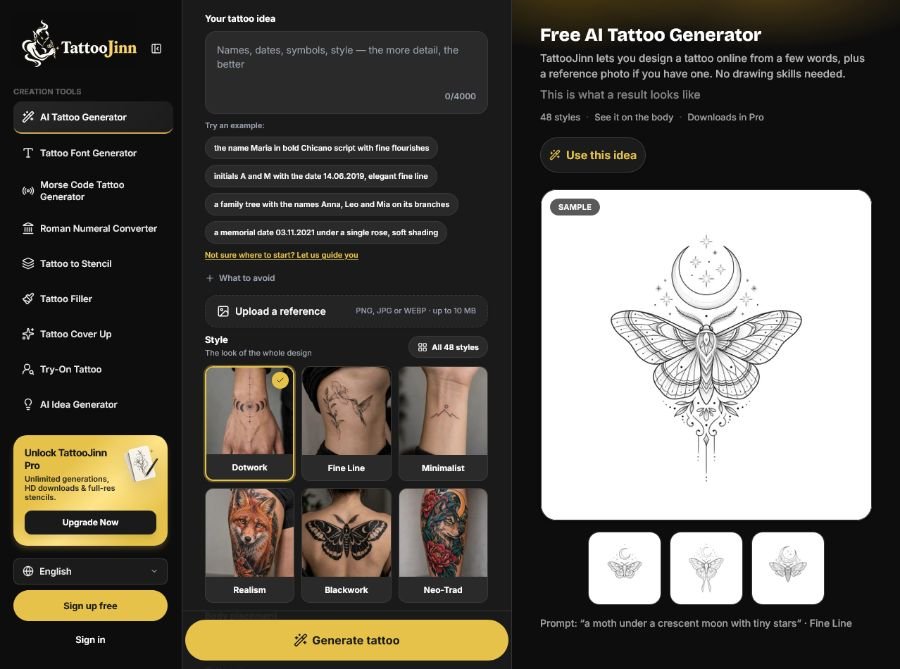
TattooJinn is a browser-based AI tattoo design tool that works like a tattoo designer for first drafts—users bring a rough idea (even a single word like “ocean”), pick from 48 tattoo styles (Fine Line, Blackwork, Realism, Japanese, Watercolor, Dotwork, Mandala, Neo-Trad, Geometric, and more), choose a body placement, and receive a set of 4 AI-generated designs per try. Unlike generic AI image generators, TattooJinn is purpose-built for tattoos with style-specific prompts, placement-aware body previews, iterative editing (describe changes in words or paint over areas with a brush), version history, and a Tattoo to Stencil feature that converts designs into clean line art for artist consultations.
It serves diverse tattoo planning workflows, including first tattoo exploration (try the same idea on multiple placements), cover-up planning (Tattoo Cover Up from skin photos), filler design (Tattoo Filler for gaps between pieces), try-on visualization (Try-On Tattoo on your own skin), name/date/quote designs (Tattoo Font Creator), and AI idea generation (AI Tattoo Idea Generator for concept suggestions)—all with privacy-focused image handling (PNG, JPG, WEBP up to 10MB) and no drawing skills required.
Key Features of TattooJinn
- AI Tattoo Generator: Turn a few words into custom tattoo sketches—describe your idea naturally and get a set of 4 designs per try.
- 48 Tattoo Styles: Choose from Fine Line, Blackwork, Realism, Japanese, Watercolor, Dotwork, Mandala, Neo-Trad, Classic, New School, Black & Grey, Trash Polka, Geometric, Old School, Tribal, and more.
- Body Placement Preview: See your design on a stock photo of the spot you picked (wrist, forearm, ankle, shoulder, spine, ribs, etc.) to check how it sits and flows.
- Try-On Tattoo: Upload a photo of your skin to see the design on your body before you get inked.
- Tattoo to Stencil: Turn your favorite design into clean line art (draft stencil) for artist consultations—uses one try.
- Tattoo Font Creator: Set names, dates, or short quotes in different lettering styles with a free tattoo font generator.
- Tattoo Filler: Fill gaps between existing tattoos starting from a photo of your skin.
- Tattoo Cover Up: Plan cover-up designs for old tattoos starting from a photo of your skin.
- AI Tattoo Idea Generator: Get tattoo ideas in words when you only know what the tattoo should mean—open any idea with one click.
- Iterative Editing: Refine designs by describing changes in words or painting over areas with a brush—every edit saved as a new version.
- Version History: Track design versions (v1, v2, v3) with labels like “Crescent moon” or “Bolder lines” for comparing iterations.
- Reference Image Support: Upload a photo, picture, or sketch (PNG, JPG, WEBP up to 10MB) as inspiration—AI generates new designs inspired by it, not exact copies.
- Tattoo Ideas Gallery: Browse pre-made tattoo ideas (Fine-line moth under moon, Micro butterfly, Moon phases, Wildflower bouquet) that open with the generator pre-filled.
- Tattoo Size Options: Select tattoo size (small, medium, large) for appropriate design scaling.
- Artist Consultation Ready: Bring a few visual directions to your tattoo artist instead of a long description—pointing at one design beats explaining from scratch.
How to Use TattooJinn
- Visit TattooJinn.com: Navigate to tattoojinn.com through your web browser on desktop or mobile—no app download required for web access.
- Describe Your Idea: Type your tattoo idea in natural language (e.g., “a moth under a crescent moon with tiny stars”)—a single word like “ocean” works too.
- Upload Reference Image (Optional): Add a photo, picture, or sketch (PNG, JPG, WEBP up to 10MB) to guide the look—AI generates new designs inspired by it.
- Pick a Style: Choose from 48 tattoo styles, including Fine Line, Blackwork, Realism, Japanese, Watercolor, Dotwork, and more.
- Select Body Placement: Choose where the tattoo goes (wrist, forearm, ankle, shoulder, spine, ribs, etc.) for placement-aware previews.
- Set Size and Color: Select tattoo size (small, medium, large) and color preferences for appropriate design scaling.
- Generate Designs: Click Generate to receive a set of 4 AI-generated tattoo designs per try (4 free tries without an account, 50+ more with a free account).
- Preview on Body: See one design on a stock body photo of your chosen placement to check how it sits and flows.
- Refine with Edits: Describe changes in words or paint over areas with a brush—every edit saved as a new version for comparison.
- Try Variations: Change one thing at a time (style, placement, or prompt detail) and compare new sets of designs.
- Create Stencil: Use Tattoo to Stencil to turn your favorite design into clean line art for artist consultation (uses one try).
- Save & Download: Save designs to My Projects (permanent with a free account) and download images with Pro for device storage.
- Consult Your Artist: Show your favorite design to a tattoo artist—they’ll size it for you and draw the final stencil.
Use Cases for TattooJinn
- First Tattoo Planners: Try the same idea on 2-3 placements (wrist, forearm, ankle) to see where it sits best before committing.
- Tattoo Enthusiasts: Explore new tattoo ideas, compare styles, and plan your next piece with visual references.
- Cover-Up Seekers: Plan cover-up designs for old tattoos starting from a photo of your skin with Tattoo Cover Up.
- Gap Fillers: Fill gaps between existing tattoo pieces with Tattoo Filler, starting with a photo of your skin.
- Name & Date Tattoos: Design name, date, or short quote tattoos with Tattoo Font Creator in different lettering styles.
- Memorial Tattoos: Create memorial designs (e.g., “memorial date 03.11.2021 under a single rose, soft shading”) for meaningful tributes.
- Family Tree Tattoos: Design family tree tattoos with names on branches (e.g., “family tree with the names Anna, Leo and Mia”).
- Couple & Initial Tattoos: Create initial tattoos (e.g., “initials A and M with the date 14.06.2019, elegant fine line”) for couples.
- Tattoo Artists: Use as a client consultation tool—bring visual directions instead of long verbal descriptions.
- Tattoo Studios: Help clients visualize ideas before committing to a design with body previews and style exploration.
- Tattoo Idea Seekers: Use AI Tattoo Idea Generator when you only know what the tattoo should mean—get ideas in words, then generate designs.
- Design Experimenters: Try the same idea in multiple styles (fine line vs blackwork) to see how different approaches look.
TattooJinn FAQ
Is the AI tattoo generator free?
Yes. One try—a generation, as the Pricing page calls it—gives you a set of 4 designs. Without an account: 3 tries, with 1 of the 4 designs shown each time. Free account: all 4 designs, including the sets you already made, plus 50 more tries. Pro: image downloads and no limit on tries.
How does the AI tattoo generator work?
It works from text: type a short description of the tattoo and the AI turns it into a set of designs; a reference image is optional. Pick one of 48 styles and a body placement. Once your designs are ready, you’ll see one of them on a body photo of that area.
Can I design my own tattoo if I can’t draw?
Yes, that’s the point: you describe it, the AI draws. Explain your idea the way you’d text a friend, then compare the designs you get.
Can I turn a photo into a tattoo design?
Yes, as a reference. Describe what you want in a few words, then upload a photo, picture or sketch (PNG, JPG or WEBP, up to 10 MB). You’ll get new designs inspired by it, not an exact copy.
Can AI generate a tattoo idea for me?
Yes. Start with whatever you have, even a single word like “ocean”, and see what comes back. If you only know what the tattoo should mean, try the AI Tattoo Idea Generator.
How do I get the best results?
Use your prompt for the subject and a detail or two, like “a small snake wrapped around a rose, with thorns.” Set the style, placement and color in the form. A reference image helps show the subject or layout you have in mind.
Can I use an AI tattoo design for a real tattoo?
Yes, as a first draft. Show your favorite to a tattoo artist; they’ll size it for you and draw the final stencil.
Can I preview a tattoo on my body before getting inked?
Yes. After you generate it, your design appears on a body photo of the area you chose. To see it on your own skin, open Try-On Tattoo and upload a photo of that spot.