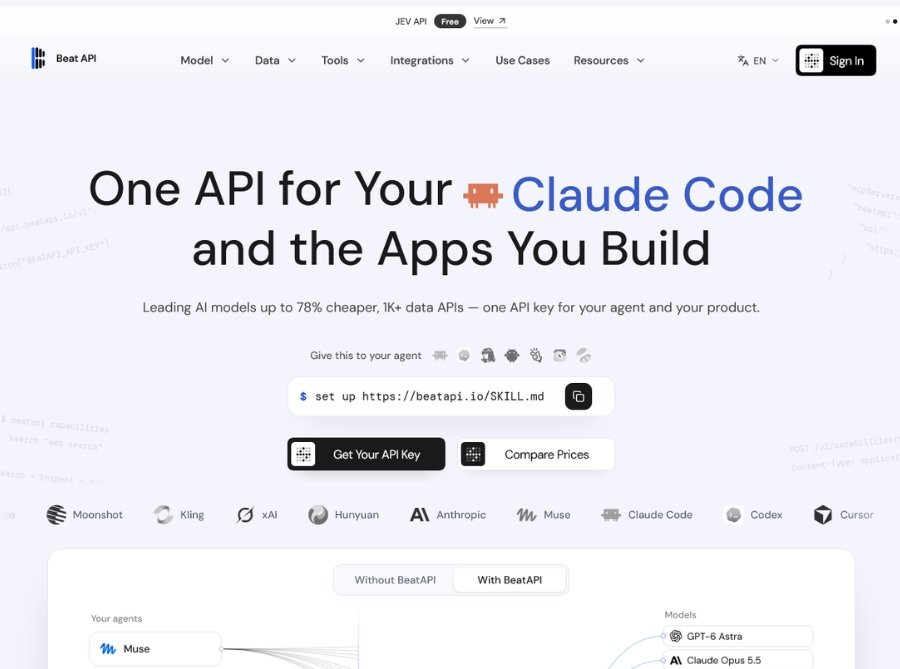
BeatAPI is a capability aggregation platform that sits between AI agents and the models, data, and tools they need—providing unified access to 70+ AI models (text, image, video), 1,000+ social data APIs, and web tools through a single API key with transparent pricing, hosted outputs, and traceable task lifecycles. Unlike traditional API aggregators or model routers that only forward chat requests to LLMs, BeatAPI covers social data extraction, web tools (search, page reading, site maps, research), and image/video/workflow tasks—all built for autonomous agent use where the agent can search the catalog, inspect capability contracts (inputs, outputs, pricing, execution mode), and run tasks independently.
The platform launched with support for major AI agents including Claude Code, Codex, Cursor, OpenCode, and Muse, plus any MCP-compatible or HTTP-capable client, enabling developers to connect their agent once and access everything from GPT-6.1 Sol and Claude Opus 5.5 to TikTok post data, Instagram creator analytics, YouTube video metrics, and AI video generation (Seedance, Veo, Kling, Wan, Nano Banana) without managing 33+ separate accounts, keys, and bills. With prepaid USD balance billing, clear prices published before each call, hosted file URLs for generated images/videos, and a 99.8% task success rate with auditable logs.
Key Features of BeatAPI
- 1,000+ Data APIs: Pull public data from TikTok, Instagram, YouTube, X (Twitter), Reddit, LinkedIn, Threads, Xiaohongshu, and Douyin—posts, profiles, comments, search results, and trends as structured JSON.
- Web Tools: Search, page reading, site maps, and multi-step research capabilities for comprehensive web data extraction and analysis.
- Single API Key: One BeatAPI key and one USD balance cover all models, social data, and web tools—no per-vendor accounts, separate bills, or provider keys to rotate.
- Agent-Native Design: Built for autonomous AI agents to search the catalog, inspect capability contracts (inputs, outputs, pricing, execution mode), and run tasks independently.
- MCP & REST Support: Works with MCP-compatible agents (Claude Code, Codex, Cursor, OpenCode, Muse) and any HTTP-capable client for flexible integration.
- Hosted Output Files: Finished image, video, and workflow tasks return hosted file URLs on the task record—no need to set up your own storage.
- 99.8% Task Success Rate: High reliability with auditable task logs, usage tracking, status monitoring, and failure reasons visible on every task.
- Prepaid Balance Billing: Calls spend from a prepaid USD balance with clear prices published before execution and cost reported on every response.
- Failure Refunds: Data and web calls that fail on BeatAPI’s side are not charged; image/video/workflow task failures are eligible for refund to balance.
- Unified Task Shape: Video, image, and workflows share one account, one task ID format, and one execution interface—POST a task, poll or wait for the file.
- Capability Inspection: Review inputs, outputs, pricing, and execution mode (sync/async) before running any capability to avoid unexpected costs or errors.
- Traceable Task Lifecycle: Every run stays visible on the task record with status, usage, files, and failure reasons for production monitoring and debugging.
- Model Variety: Text models (GPT-6, Claude, Gemini, DeepSeek, Grok), image models (GPT Image, Qwen Image, Nano Banana), video models (Seedance, Veo, Kling, Wan, MiniMax H3), and workflow models (AI Music Video, AI Ecommerce Video, Real Time Video).
How to Use BeatAPI
- Create Account & Get API Key: Sign up at beatapi.io, create your API key, and fund your prepaid USD balance for model calls and data API usage.
- Connect Your Agent: Send your AI agent one setup line: set up https://beatapi.io/SKILL.md—the agent reads the guide and asks for your BeatAPI key.
- MCP Integration (Optional): For MCP hosts, add the BeatAPI MCP server at https://beatapi.io/mcp and put your key in the host’s secret settings—never paste keys into chat.
- Search Capabilities: Your agent searches the catalog for the right model, data action, or workflow based on the task requirements.
- Inspect Contracts: Before running, inspect the capability contract to review inputs, outputs, pricing, and execution mode (sync/async).
- Run Tasks: Use the Run endpoint for supported capabilities or call the inspected API directly for direct-API contracts—all with one BeatAPI key.
- Monitor Task Status: Track task progress (queued → processing → succeeded) with hosted output URLs returned on completion for images, videos, and files.
- Review Usage & Costs: Check task logs for usage, costs, and failure reasons—every response reports what the call cost for transparent billing.
- Handle Failures: For failed calls, check error messages to determine if a retry can succeed—BeatAPI refunds eligible failures to your balance.
- Scale to Production: Use the same API key from prototype to production volume with consistent task shape, pricing, and hosted outputs across all models and data APIs.
Use Cases for BeatAPI
- Indie Developers & Startups: Use one key to try models during prototyping, then scale to production with the same key—no vendor switching or re-integration needed.
- Product & Engineering Teams: Add video, image, and data capabilities to existing products without managing extra vendors per model or data source.
- SaaS & Application Platforms: Provide one task shape for every customer regardless of which underlying model you route—simplify integration and billing.
- Agent & Automation Builders: POST tasks, poll or wait for files, and use the same interface for every run across text, image, video, and data workflows.
- Growth Marketers: Pull trending TikTok videos, Instagram creator analytics, YouTube metrics, and X/Twitter data through BeatAPI for ranked shortlists and competitive analysis.
- Content Creators: Generate vertical short clips from Seedance, create product images with GPT Image or Nano Banana, and make variations from the same prompt through agents like Cursor.
- E-Commerce Sellers: Generate clean and lifestyle product images for every listing with the image model chosen and priced before each run through OpenCode or other agents.
- Brand Partnerships: Find similar public creators on Instagram, compare followers and engagement, and identify partnership opportunities through agent-powered data extraction.
- SEO Leads: Pull keyword and search-ranking data for key pages, identify pages losing traffic, and draft fixes using Codex or other AI agents with BeatAPI data access.
- AI Video Production: Create AI music videos, e-commerce product videos, and real-time video content with unified workflow execution and hosted output files.
- Social Media Analytics: Extract posts, profiles, comments, search results, and trends from TikTok, Instagram, YouTube, X, Reddit, and LinkedIn as structured JSON for analysis.
- Web Research & Data Extraction: Use web tools for search, page reading, site maps, and multi-step research to gather comprehensive web data for agent workflows.
BeatAPI FAQ
What is BeatAPI?
BeatAPI is the capability layer for AI agents—one API key gives Claude Code, Codex, Cursor, Muse, or your own app access to 70+ AI models, 1,000+ social data APIs, and web tools for search, page reading, and research. Your agent finds the right capability, checks its inputs and price, then runs it.
How is BeatAPI different from an API aggregator or model router?
A model router forwards chat requests to LLMs. BeatAPI also covers social data, web tools, and image/video/workflow tasks, and it is built for agents to use autonomously: search the catalog, inspect a capability’s input schema and price, then run it. The agent reads the contract before it spends anything.
Which AI agents work with BeatAPI?
Claude Code, Codex, Cursor, OpenCode, Muse, and any client that supports MCP or can make HTTP requests. Each agent has a setup guide on the Integrations page, and apps can call the same API directly.
How do I connect my AI agent to BeatAPI?
Send your agent one line: set up https://beatapi.io/SKILL.md. It reads the guide and asks for your key. For MCP hosts, add the server https://beatapi.io/mcp and put your key in the host’s secret settings—never paste a key into chat.
What data can my agent get through BeatAPI?
Public data from TikTok, Instagram, YouTube, X, Reddit, LinkedIn, Threads, Xiaohongshu, and Douyin: posts, profiles, comments, search results, and trends. Web tools add search, page reading, site maps, and multi-step research. Results come back as structured JSON your agent can rank, compare, and cite.
Do I need a separate API key for each model or data provider?
No. One BeatAPI key and one USD balance cover models, social data, and web tools: no per-vendor accounts, separate bills, or provider keys to rotate.
How does BeatAPI pricing work?
Calls spend a prepaid USD balance. Every capability publishes its price before you run it, and every response reports what the call cost. Model prices are listed next to the official provider rate on the pricing page, with discounts up to 78% (48% average).
What happens if a call fails? Am I still charged?
Data and web calls that fail on BeatAPI’s side are not charged. For image, video, and workflow tasks, BeatAPI reserves the price when the task is accepted and refunds eligible failures to your balance. Every error also says whether a retry can succeed, so agents don’t loop.
Does BeatAPI host the images and videos it generates?
Yes. A finished image or video task returns a hosted file URL on the task record, so your agent can hand over a link without you setting up storage.
What is the task success rate?
BeatAPI maintains a 99.8% task success rate with auditable logs, usage tracking, visible task status, and failure reasons on every task for production monitoring.